
£4.85
Add to Cart
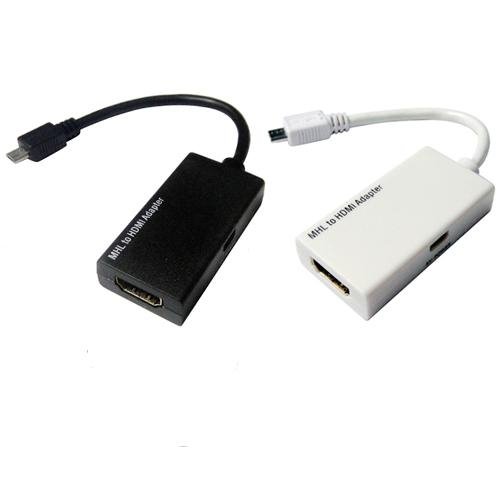
1080P MHL Micro USB to HDMI HDTV ADAPTER CABLE LEAD FOR Samsung Galaxy S1 S2


More than 10 available
Details
Shipping: United Kingdom: free (more destinations)
Condition: Brand new
*The store has not been updated recently. You may want to contact the merchant to confirm the availability of the product.
HDMI output on a compatible TV
Enjoy high quality video content from your Galaxy S4 smartphone on an HD TV by using a Samsung MHL 2.0 HDTV adaptor. Share media content instantaneously with family and friends. Simply plug the MHL 2.0 HDTV adaptor and the content on your smartphone will be shown on the TV screen.
Accessory
White Colour
Input: MHL 2.0 / Output: HDMI upto 1080p
Interface 1 : 11 pin Micro USB / Interface 2 : HDMI A Type / Interface 3 : 5 pin Micro USB
Retail Box Packaging
Net: 43.3g
1 x Micro USB to HDMI HD TV Adapter Cable
The HDTV Universal Adapter supports HD signals of up to 1080p and connects directly to your MHL-enabled mobile phone's 11-pin Micro USB socket. Then, just connect a standard HDMI cable* to your home theatre system, TV or monitor for that big picture experience. The adapter needs to be connected to a power source via the Micro USB port to operate unless you have a TV that supplies power through the HDMI port.
*HDMI Cable and Micro USB Travel Charger sold separately. Check your device for an 11-pin connector before connecting the MHL cable.
Only Compatible as follow:
Galaxy S4 S4 i9500, LTE i9505 -(MHL 2.0 support)
Galaxy S3 i9300, S3 LTE i9305 -(MHL 1.0 support only)
Galaxy S3 Verizon i535 -(MHL 1.0 support only)
Galaxy S3 T-Mobile T999 -(MHL 1.0 support only)
Galaxy S3 at&t i747 -(MHL 1.0 support only)
Galaxy Note 2 II N7100 -(MHL 1.0 support only)
CAN NOT be used for standard micro USB MHL mobile phone like i9100 i9220 Note and the other version of Note2.
How to use?
1. MHL must be connected to Geniune S3 S4 or Note2 power adapter through the Micro USB cable, the power adapter and the Micro USB cable came with the Phone.
Computer 's USB voltage may be not enough for power source.
2. Use a Good quality HDMI cable to connect the MHL adatper and TV, Please change the TV to HDMI Channel (consult your TV owner's manual).
3. All ready, you must restart your phone S3 S4 or Note2.
4. The MHL output does not need any settings, restart the phone then The TV screen will display what is on your phone.
Note: MHL adapter may not function properly when used with other travel chargers or desktop dock
Enjoy high quality video content from your Galaxy S4 smartphone on an HD TV by using a Samsung MHL 2.0 HDTV adaptor. Share media content instantaneously with family and friends. Simply plug the MHL 2.0 HDTV adaptor and the content on your smartphone will be shown on the TV screen.
Accessory
White Colour
Input: MHL 2.0 / Output: HDMI upto 1080p
Interface 1 : 11 pin Micro USB / Interface 2 : HDMI A Type / Interface 3 : 5 pin Micro USB
Retail Box Packaging
Net: 43.3g
1 x Micro USB to HDMI HD TV Adapter Cable
The HDTV Universal Adapter supports HD signals of up to 1080p and connects directly to your MHL-enabled mobile phone's 11-pin Micro USB socket. Then, just connect a standard HDMI cable* to your home theatre system, TV or monitor for that big picture experience. The adapter needs to be connected to a power source via the Micro USB port to operate unless you have a TV that supplies power through the HDMI port.
*HDMI Cable and Micro USB Travel Charger sold separately. Check your device for an 11-pin connector before connecting the MHL cable.
Only Compatible as follow:
Galaxy S4 S4 i9500, LTE i9505 -(MHL 2.0 support)
Galaxy S3 i9300, S3 LTE i9305 -(MHL 1.0 support only)
Galaxy S3 Verizon i535 -(MHL 1.0 support only)
Galaxy S3 T-Mobile T999 -(MHL 1.0 support only)
Galaxy S3 at&t i747 -(MHL 1.0 support only)
Galaxy Note 2 II N7100 -(MHL 1.0 support only)
CAN NOT be used for standard micro USB MHL mobile phone like i9100 i9220 Note and the other version of Note2.
How to use?
1. MHL must be connected to Geniune S3 S4 or Note2 power adapter through the Micro USB cable, the power adapter and the Micro USB cable came with the Phone.
Computer 's USB voltage may be not enough for power source.
2. Use a Good quality HDMI cable to connect the MHL adatper and TV, Please change the TV to HDMI Channel (consult your TV owner's manual).
3. All ready, you must restart your phone S3 S4 or Note2.
4. The MHL output does not need any settings, restart the phone then The TV screen will display what is on your phone.
Note: MHL adapter may not function properly when used with other travel chargers or desktop dock


 GB, Middlesex